
2 / 7
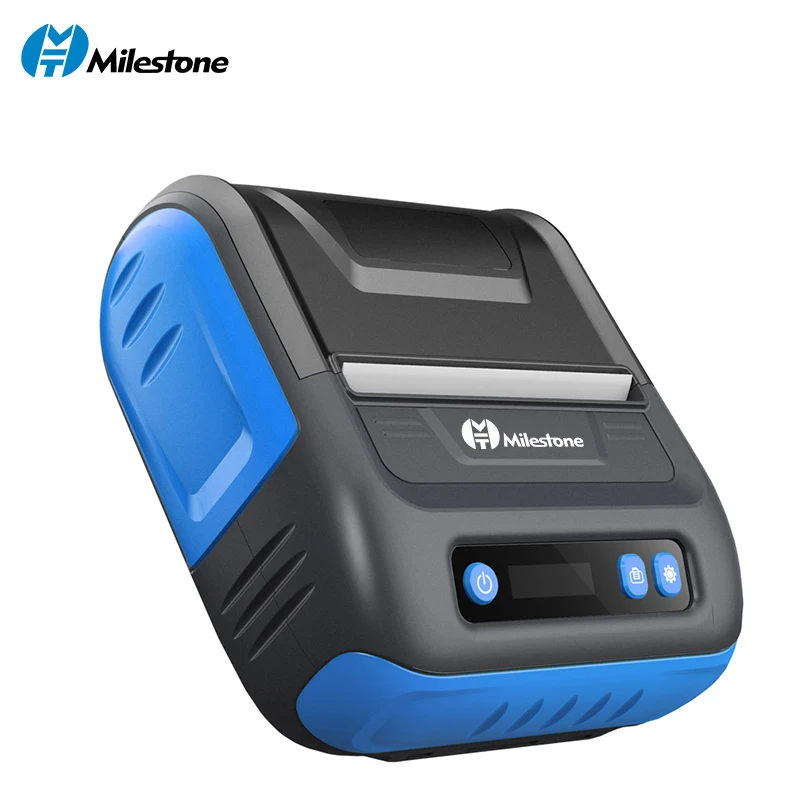
Milestone 80mm Mobile PortableThermal Direct Label Printer Bluetooth Pocket Printer Receipt 2 in APP Android IOS Mini Printer
|판매 600+|
최저가
₩ 72,100
2026.07.04 확인됨(3개월내 최저가)
색상:
플러그 유형:
추천 상품 & 제휴 영역
리뷰 (60)
4.8인증된 구매 후기
★★★★★
52
★★★★
6
★★★
1
★★
0
★
1
포토 후기 모음
AI 상품 요약
- •Milestone All in one USB/Buletooth Protable Thermal Printer Lable Maker 3inch/80mm For Print Barcode Lable Ticket Receipt bill
- •-USB or Bluetooth interface
- •-Suitable for Android IOS and Windows system
- •-Can meet work needs in a variety of situationsFlexible and powerful
- •-Receipt printer and Lable printer
- •-Print thermal paper or label paper
- •-Adjustable print width:80mm
- •-Multi-scene application
- •-Apply to supermarket,retail shop,catering,clothing shop,drug store,book shop,logistics&express etc.
- •Support muti-languages: English(Default), Arabic,Cyrillic,French,Greek,Korean,Portuguese,Russian, Spanish
- •1.Dual Printing Mode: Thermal Printer Wireless-Android/IOS Phone Printing via Bluetoothwith Label and Receipt printer application
- •2.New Style,Environment Friendly: This Bluetooth receipt/label 2 in 1 printer, thermal label/barcode /receipt printer, support lots of label printing, NO ribbon /ink cartridges Needed
- •4.Multiple Modes and Convenient printing: Compatible with ESC/POS print command; support 1D,2D barcode printing,receipt printing,bill printing,label printing and etc;compact design and lightweight,convenient for indoor and outdoor working environments
- •5.Sale Service: Full technical support, all thermal printer are covered by 100% satisfaction and full refund Guarantee
- •QUESTION ANSWER
- •It can print russian,spanish language and other different languages,, account is "MHT" or "1", needn't password, then direclty click login, needn't to register in this app.
- •In this app, both can print receipt and label , you can choose it , in this app, you can connect bluetooth of printer.this is our company website,also can download app from this webhttp://en.gzmht.com
- •2.in the app, select bluetooth of printer
- •3.connect the bluetooth
- •4.can print by phone through bluetooth
- •Note: can't find bluetooth of printer in phone's setting ,can't connect bluetooth in setting,only can connect bluetooth in our app
- •1 x Paper Roll,
- •1 x Power Adapter,
- •1 x Bilingual User Manual in English and Chinese
- •1 x CD installation videoput all of these in one box
- •1.After-sale warranty period is 2 years
- •2.After you receive package, if having any
- •problem,please contact us in time before giving feedback, we will send you video to solve your problem ,we also can solve problem by remote,if can't solve,please contact us for a solution.
- •if you like our products, please give us 5 stars positive feedbac,it's very important for us.
- •Default printing language is English, if you want to print other language, please leave message ,for example, if you want to print Russia, when place order, please leaving message telling this , our engineer will operate printer to let it print Russia,it can print Russia and English at same time.
- •OUR CERTIFICATES
- •With research and devlopment as well as production and marketing,Milestone,as a high technology enterprise,has been specialized in the thermal printers for about 7 years.With economy booming,there are more and more newly types of thermal printers fromMilestone.
- •Morever,we have a strong research and development team.We always stick to the "quality of survival,innovation and development,servise and win-win" business philosophy.
E
E***k
색상:파란색 플러그 유형:EU 배송지:China Mainland
다른 프린터, 좋은 제품이지만, 아쉽게도 폴란드 문자(ś, ć, ż)를 지원하지 않습니다.
P
P***i
색상:기타 플러그 유형:EU 배송지:China Mainland
알겠습니다. 안드로이드 기본 앱에서는 인쇄가 안 되네요. 앱 자체는 괜찮은데, 구글 크롬에서 인쇄해야 해요. 혹시 드라이버 문제일까요? ?
j
j***e
색상:파란색 플러그 유형:EU 배송지:China Mainland
상태가 양호하게 도착했고, 함께 제공된 배터리가 소모되었지만 이제는 충전되지 않습니다.
d
d***r
색상:파란색 플러그 유형:EU 배송지:China Mainland
사용하기가 매우 쉬운 항목은 아니며 전자 및 컴퓨터 사용에 대한 고급 전문 지식이 필요합니다. 사용자 가이드에서는 구매자가 프린터를 휴대폰 앱으로만 사용한다고 가정합니다. PC 앱 없음 - 미국을 검색해야 했어요. 사용자 가이드에서 찾을 수 없는 PC 애플리케이션을 찾을 수 있는 마일스톤 웹사이트입니다. 공장 설정을 재설정하고 싶을 경우를 대비해 설명서도 찾을 수 없고, 실수로 재설정한 경우 중국어로 어떻게 정리하나요? 배울 것이 많고 최종 만족을 얻을 때까지 검색할 것이 많습니다... 사용자 가이드의 조언: 사용자 가이드를 주의 깊게 읽으십시오. 돋보기가 필요할 수도 있습니다. 나는 그것이 아주 좋은 기술이라고 생각하지만 사용/배우기가 그리 간단하지는 않습니다. 내 차 한잔은 아니지만.
프린터 / 복합기 인기 상품

연관 상품

실시간 인기 추천 상품

최저가₩ 72,100